VSee 2025
PypeDeid
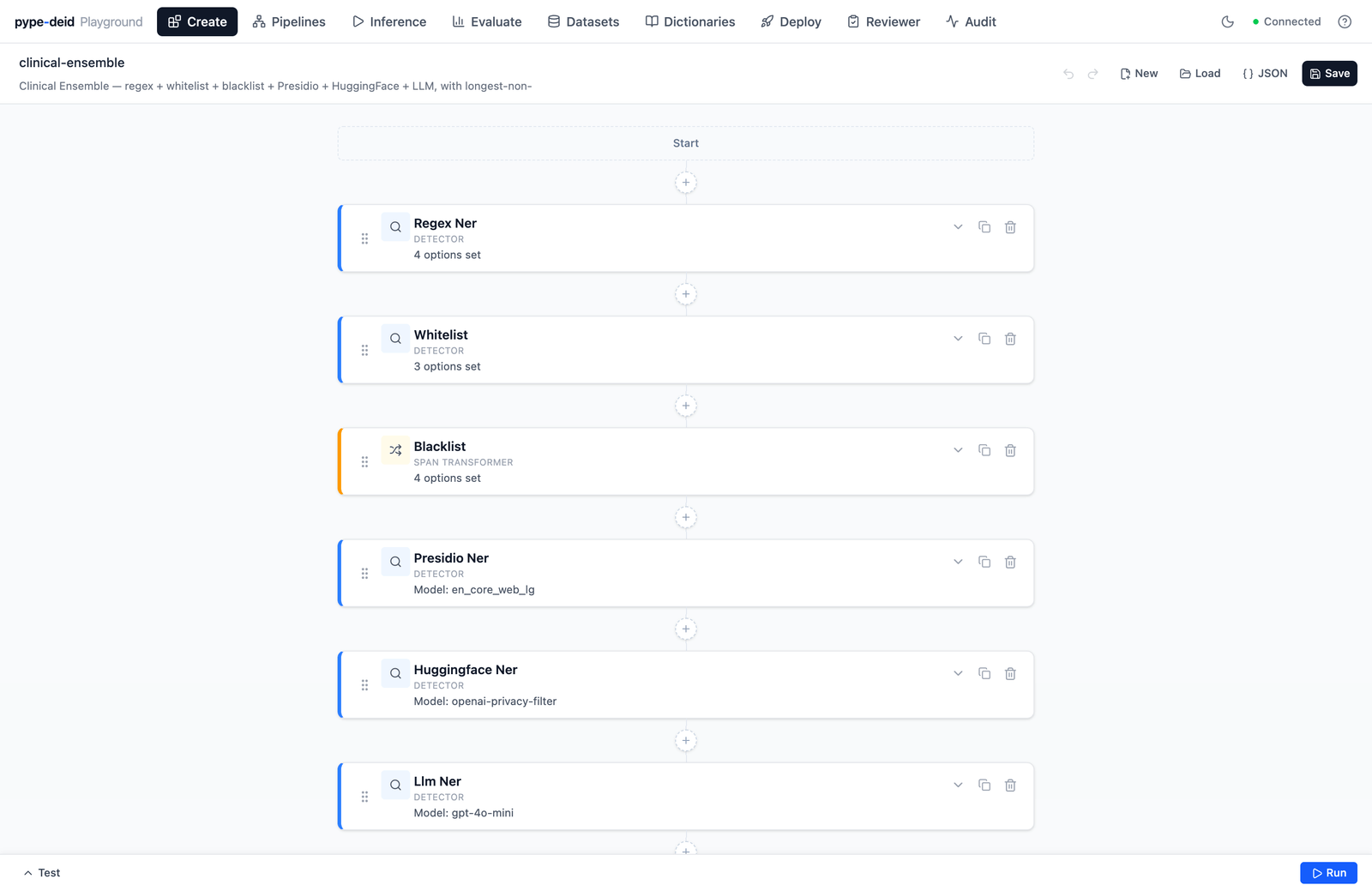
The clinical-ensemble pipeline in the visual builder — six detectors stacked end-to-end, the whole thing serializable to one JSON file.
Where the data is
Hospitals and clinics are sitting on the largest collection of medical text that’s ever existed. If you wanted to train a real medical NLP model, license a dataset to a pharma research group, or just run internal analytics on your own patient population, that’s where the data is. HIPAA blocks all of it without de-identification first — the eighteen Safe Harbor categories have to come out before the corpus can leave the four walls of the provider. That gate is where I came in.
The service I was trying to replace
VSee had two things in production for de-id, and both of them were mine. A few-shot LLM prompt for the simple case, and a small dockerized microservice with a fine-tuned NER model behind a deid=ml | deid=llm switch on the client API. Clients used it, but the same two complaints kept coming back — to swap detection strategy you had to restart the service, and there was no way to give one client a tailored detector setup. I did some research, and the current state-of-the-art de-identification provider, John Snow Labs, uses a layered approach: regex, ML, and LLM together, with the overlaps resolved deliberately. Combined with the per-client pain in my own service, that pointed clearly at what to build next.
A different shape
I started over.
One engineer, about five weeks — a week on the pipe abstraction, then a month on the API and the two React UIs. Instead of a service with a strategy switch, a service where de-id is a pipeline — a sequence of small detectors, each doing one thing, stacked together however you want. A regex pipe catches the easy stuff (dates, phone numbers, MRNs). A whitelist pipe matches names against curated dictionaries. A Presidio pipe runs Microsoft’s NER. A HuggingFace pipe runs a fine-tuned BERT. An LLM pipe asks GPT to find what slipped through. After the detectors have all had a say, a span-resolution pipe merges the overlaps — strategies include union, consensus, max-confidence, and longest-non-overlapping; you pick the one that fits your risk posture.
The first time a single regex pipe ran end-to-end through POST /process/clinical-fast and returned spans in the right shape — just regex catching dates, nothing fancy — I knew the protocol was going to hold. The output wasn’t impressive. The surface contract was.
The whole pipeline serializes to one JSON file under data/pipelines/. Want to switch a client from “regex-only” to “regex + Presidio + LLM ensemble”? Change the pipeline name in their config. No restart.
{
  "pipes": [
    {"type": "regex_ner",        "config": {"pattern_pack": "clinical_phi", ...}},
    {"type": "whitelist",        "config": {"labels": {"NAME": {"terms": ["Sarah"], ...}}}},
    {"type": "blacklist",        "config": {"match": "any_token", ...}},
    {"type": "presidio_ner",     "config": {"model": "spacy/en_core_web_lg", ...}},
    {"type": "huggingface_ner",  "config": {"model": "openai-privacy-filter", ...}},
    {"type": "llm_ner",          "config": {"model": "gpt-4o-mini", "temperature": 0.0, ...}},
    {"type": "resolve_spans",    "config": {"strategy": "longest_non_overlapping"}}
  ],
  "description": "Clinical Ensemble — regex + whitelist + blacklist + Presidio + HuggingFace + LLM."
}
That’s the actual clinical-ensemble.json, abbreviated. The whole pipeline is one file. Git is the version control. There is no database.
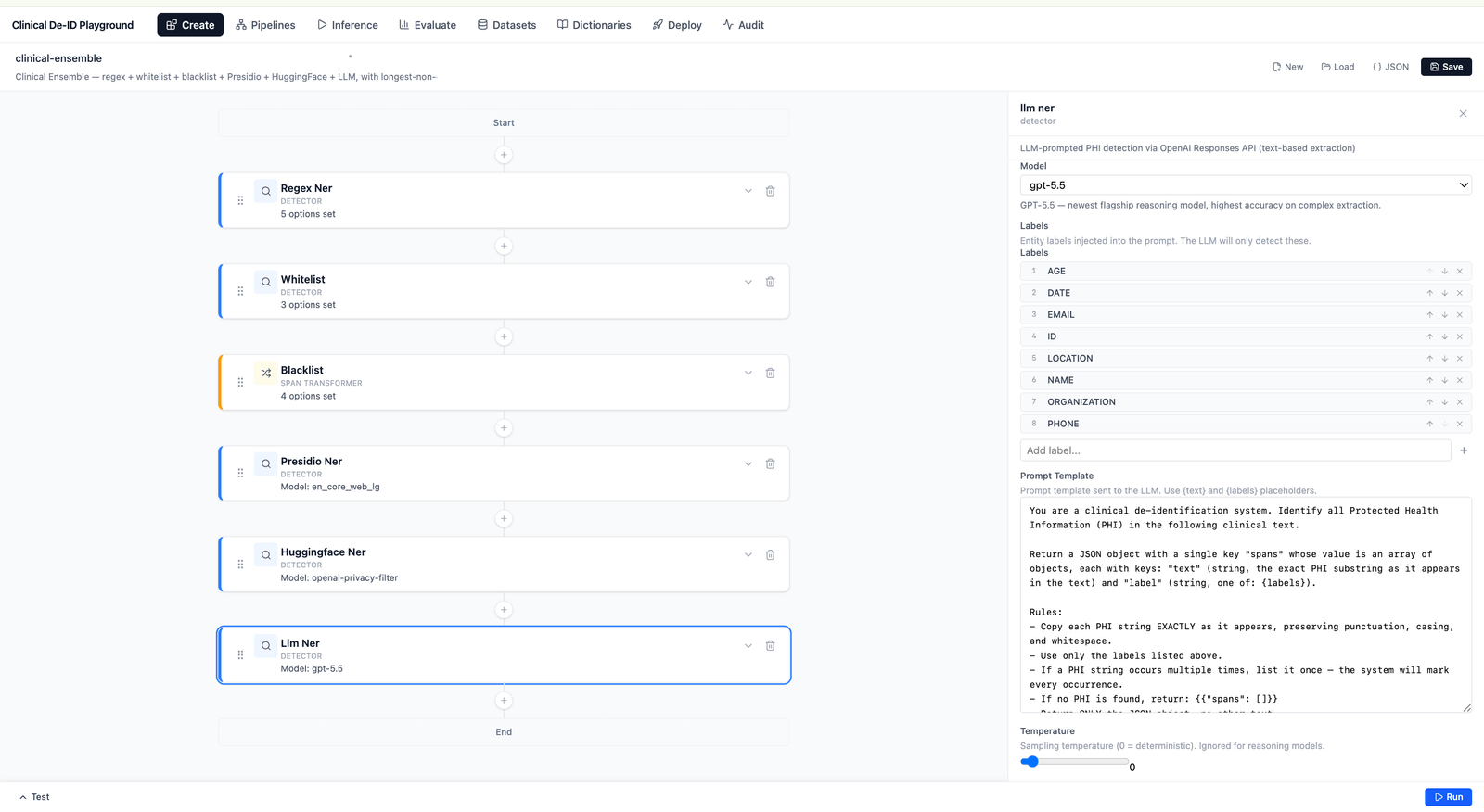
The pipeline builder, with the LLM detector’s config open in the side panel. The form on the right wasn’t hand-built for the LLM pipe — it’s generated from the pipe’s config description.
The harder part is the part the screenshot doesn’t show. I knew I’d be adding pipes for years — every new model release, every new client request, every regulatory tweak, another pipe. The naive path was per-pipe-type forms in the frontend: each new pipe ships with a custom React component that knows about its config fields. That would have defeated the whole premise — now adding a detector is a backend change and a frontend change and a deploy, with the frontend maintainer as the bottleneck. So I set a constraint: adding a new pipe shouldn’t require touching the frontend at all.
The way that worked out is that every pipe describes its own configuration — what fields it takes, what types they are, what UI widgets they should render with. The admin app reads those descriptions on load and generates the forms automatically. A new pipe is now: write the config class, write the detector logic, register it with the system. Nothing else.
The contract that made that work is one sentence. The frontend knows about JSON Schema, not about pipes. Every other extensibility property fell out of that one constraint for free.

The same contract, moving: change the HuggingFace model, the labels and context window refresh live from what the new model declares. No code change.
Dictionaries
Two of the pipes — whitelist and blacklist — don’t have models behind them. They have term lists. Whitelist gazetteers cover what you want to catch as PHI (first names, last names, hospitals, cities, insurance carriers). Blacklists cover what you want to not catch (clinical abbreviations, EHR boilerplate, medical phrases that would otherwise trigger false positives). Different pipelines pull different combinations from the same library.
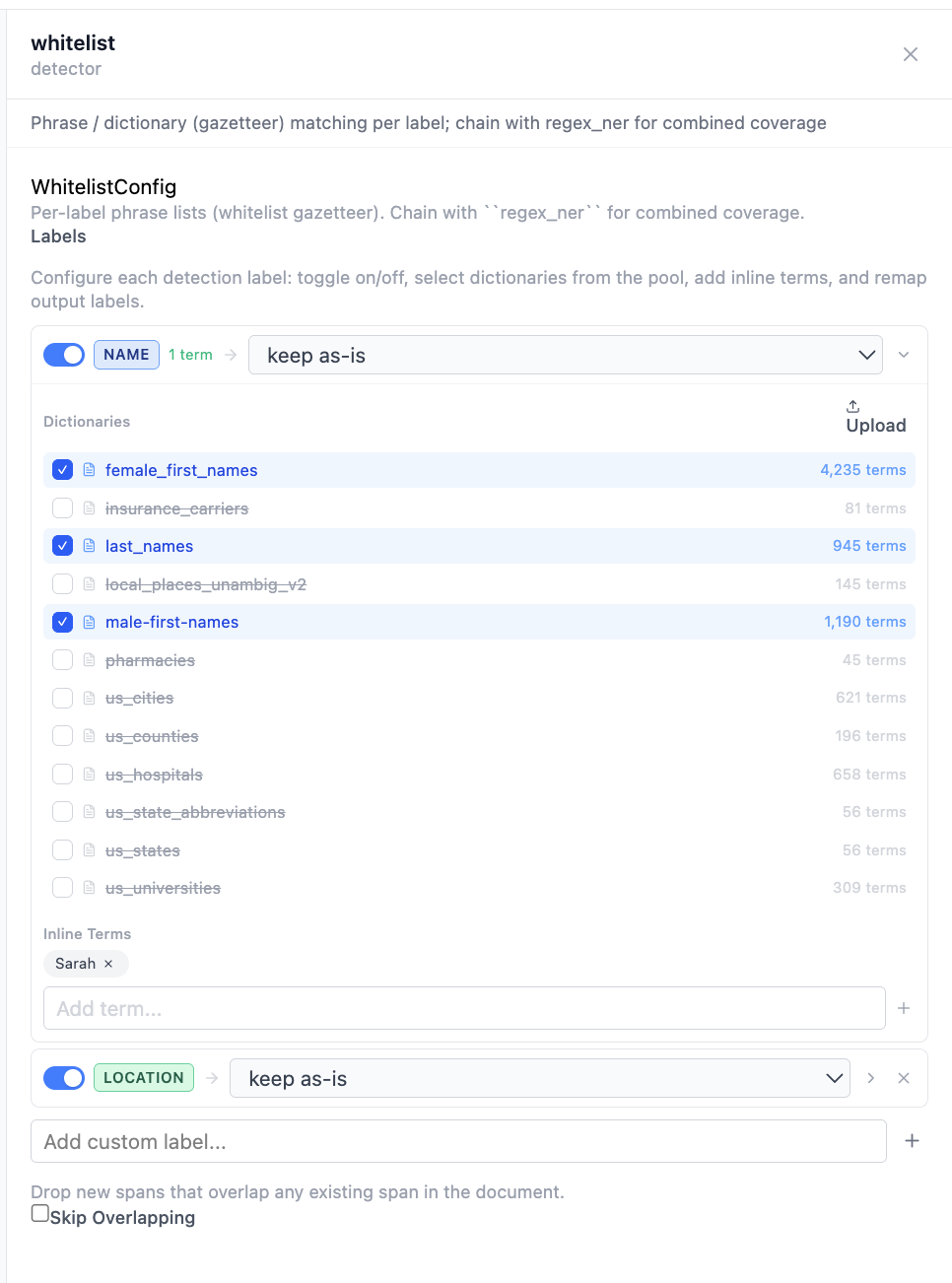
Inside a whitelist pipe: three name dictionaries selected for the NAME label, plus an inline term added directly. Same idea as the model-backed pipes — pick what you want, the form renders itself.
Datasets
An eval is only as good as what you run it against. Datasets are the corpora pipelines run over — for evaluation or batch inference. Register a JSONL file, import a BRAT tree, or generate synthetic clinical notes via LLM with PHI extraction and span alignment so the generated data is gold-labeled from the start.
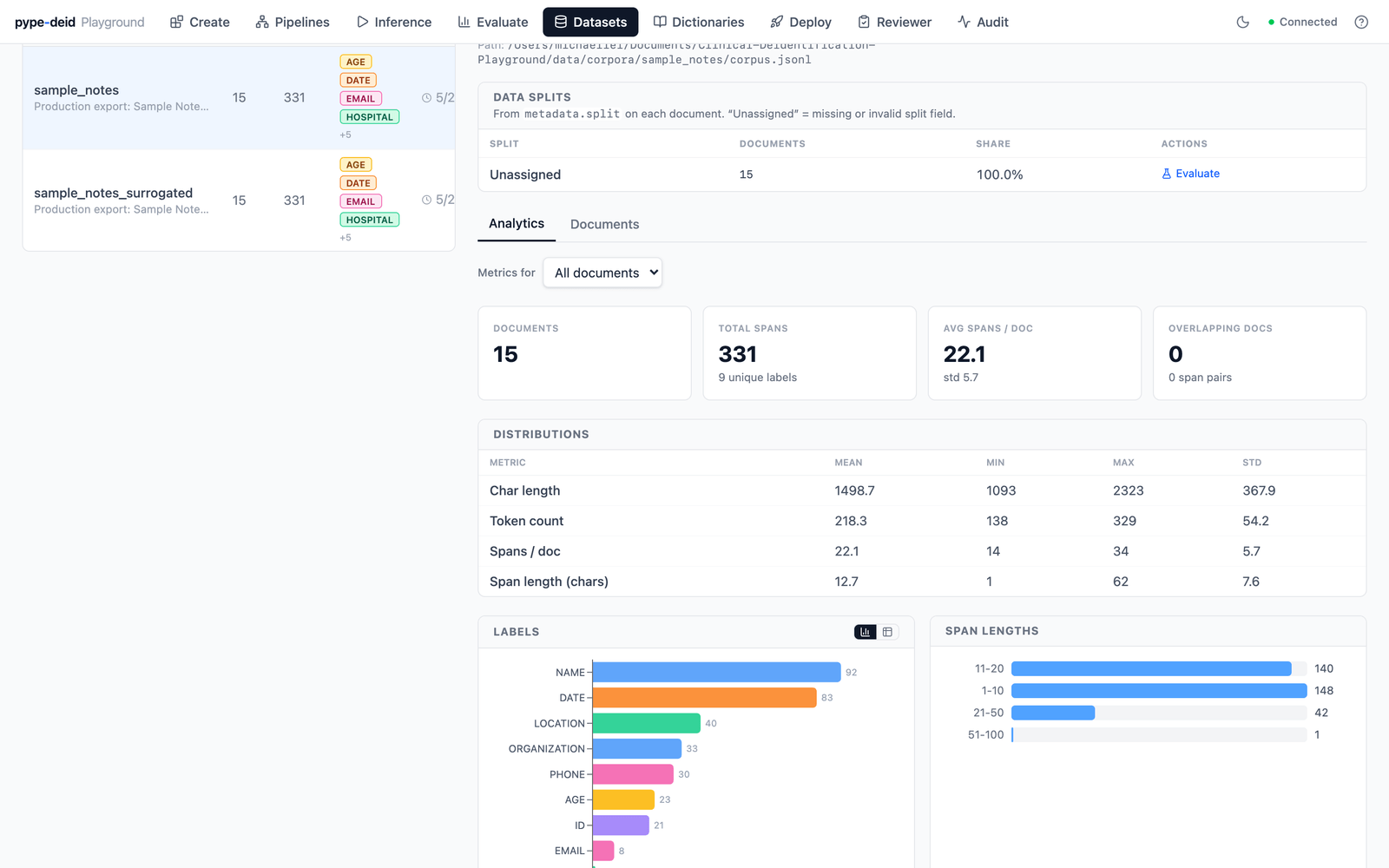
Corpus-level analytics for a registered dataset. The label-distribution chart, color-coded by semantic family, makes the corpus’s label balance obvious — and corpus issues show up here before they ever look like model issues.
Evaluation
Evaluation is how you decide whether a pipeline is good enough to deploy and where it falls short if it isn’t. Standard NER metrics lie about de-identification — missing one phone number in one note matters much more than missing a non-identifying date in fifty notes. The engine reports four matching modes side by side (strict, exact-boundary, partial-overlap, token-level BIO), risk-weighted recall using HIPAA severity weights, HIPAA Safe Harbor 18-identifier coverage, and per-label breakdown.
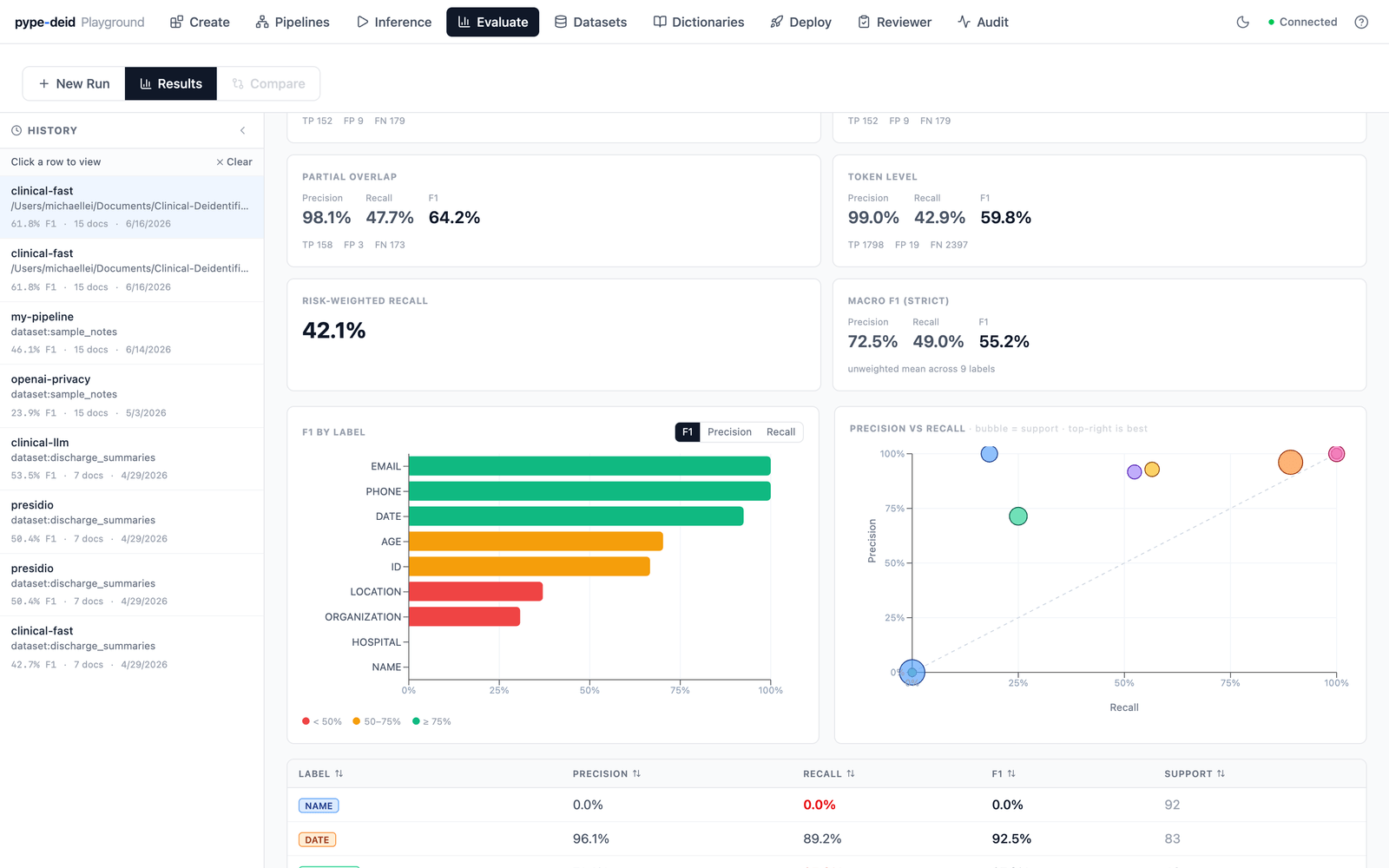
The precision/recall scatter puts it in one glance: NAME is the biggest bubble (most support) yet sits at 0% recall. That isn’t a model failure — it’s the engine catching a label-space mismatch between gold corpus and pipeline output, exactly the kind of silent issue that tanks F1 if you’re not looking for it.
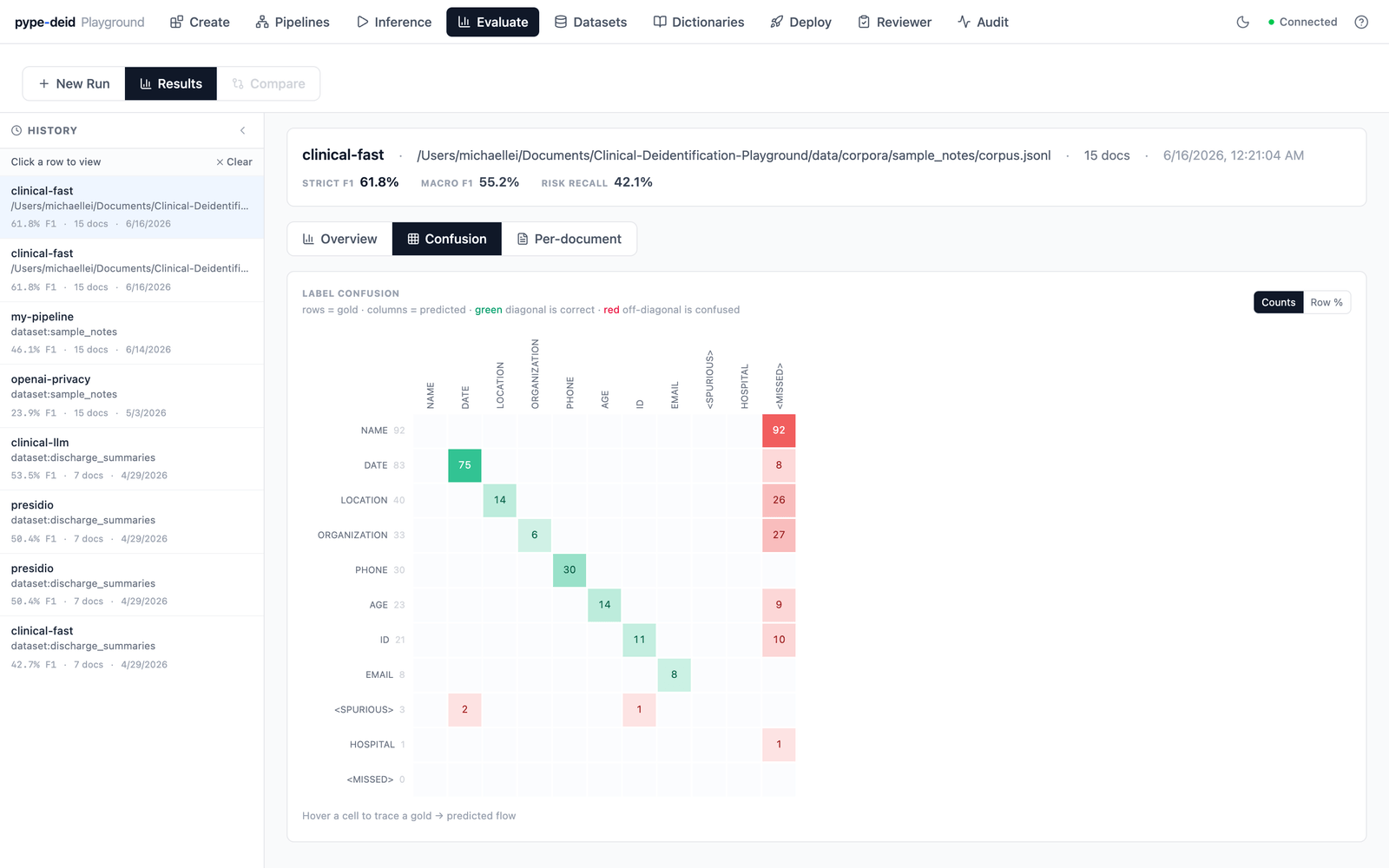
The same failure from another angle: hovering any cell traces a gold→predicted flow, and the MISSED column shows exactly which gold labels the pipeline never proposes — here, all of NAME.
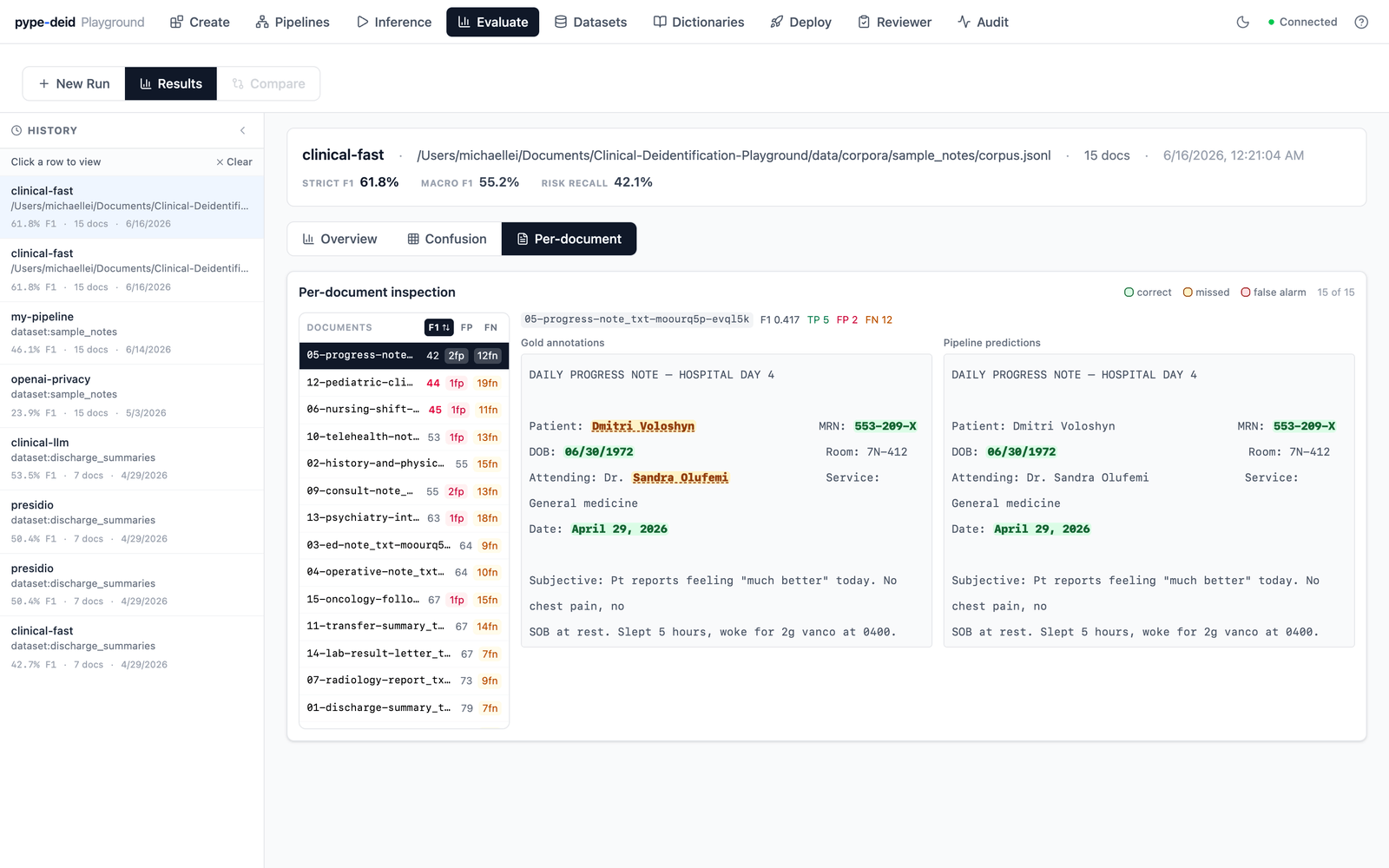
Drilling into a single document: structured identifiers (MRN, dates) come back green, but every person name is amber — missed. The aggregate metrics told you NAME recall was 0%; this tells you exactly which spans, in which note.
The point isn’t to score one pipeline. It’s to compare. Same dataset, two pipelines, four matching modes: you find out which is production-ready, which needs more work, and which labels are the weak ones.
Stable names, moving pipelines
Clients don’t talk to specific pipelines. They talk to modes — short aliases like fast or ensemble that map to a saved pipeline file on disk. A client integrates against POST /process/fast once and stops thinking about it. Internally, that alias points to a pipeline JSON. The operator can repoint fast to a different pipeline whenever they want — swap fast from clinical-fast to clinical-ensemble, edit the underlying pipeline JSON in place, or deprecate the old pipeline entirely and route the alias to its replacement. The client’s URL doesn’t change. Their integration code doesn’t change. The behavior behind the endpoint changes underneath them without them knowing.
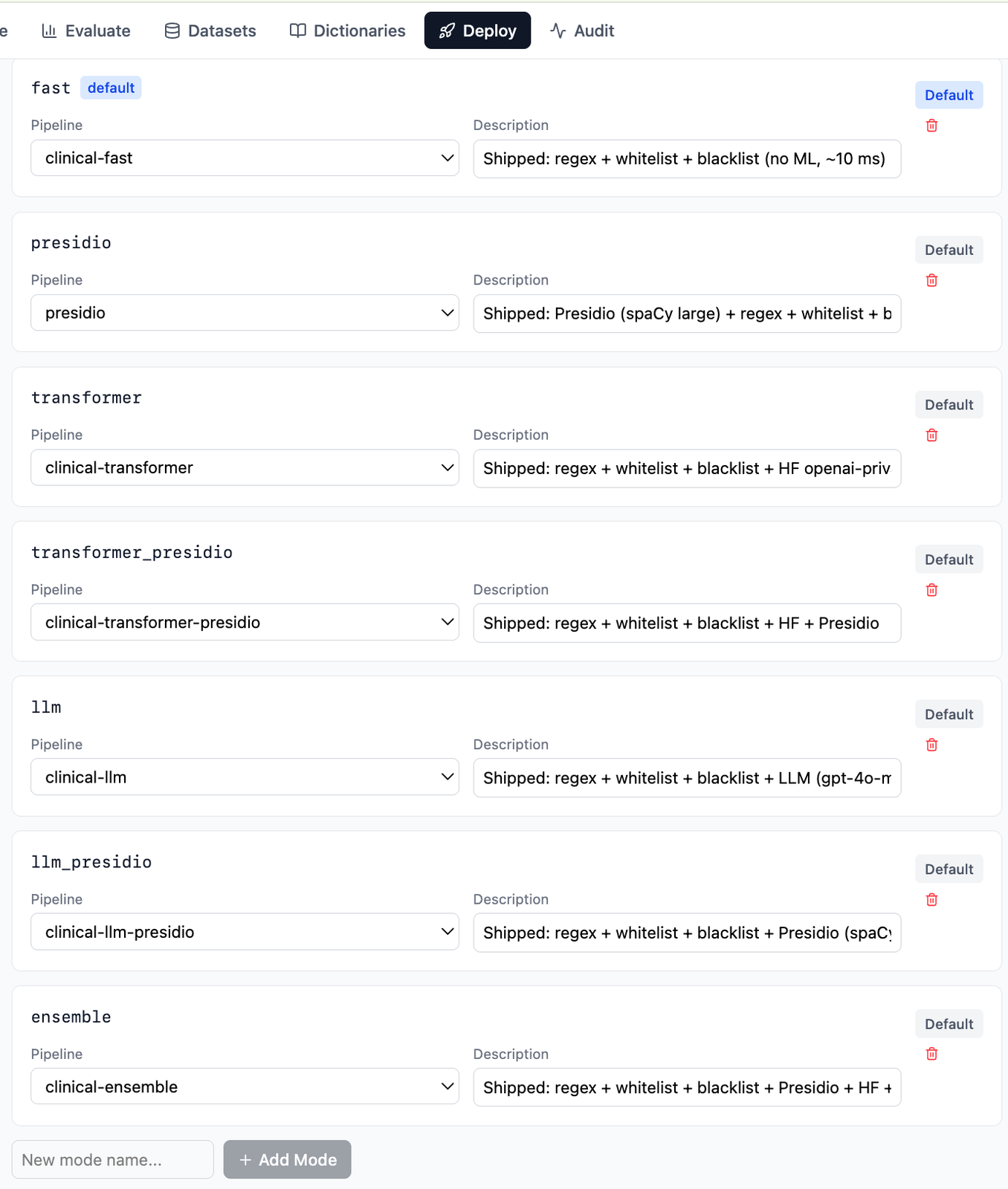
Each mode is a stable client-facing name; the dropdown beside it is what the operator changes when the underlying pipeline needs to change.
Picking a mode is also picking a latency profile, and the inference view makes that tradeoff legible: every run renders an execution waterfall showing where the request’s time actually went, pipe by pipe.
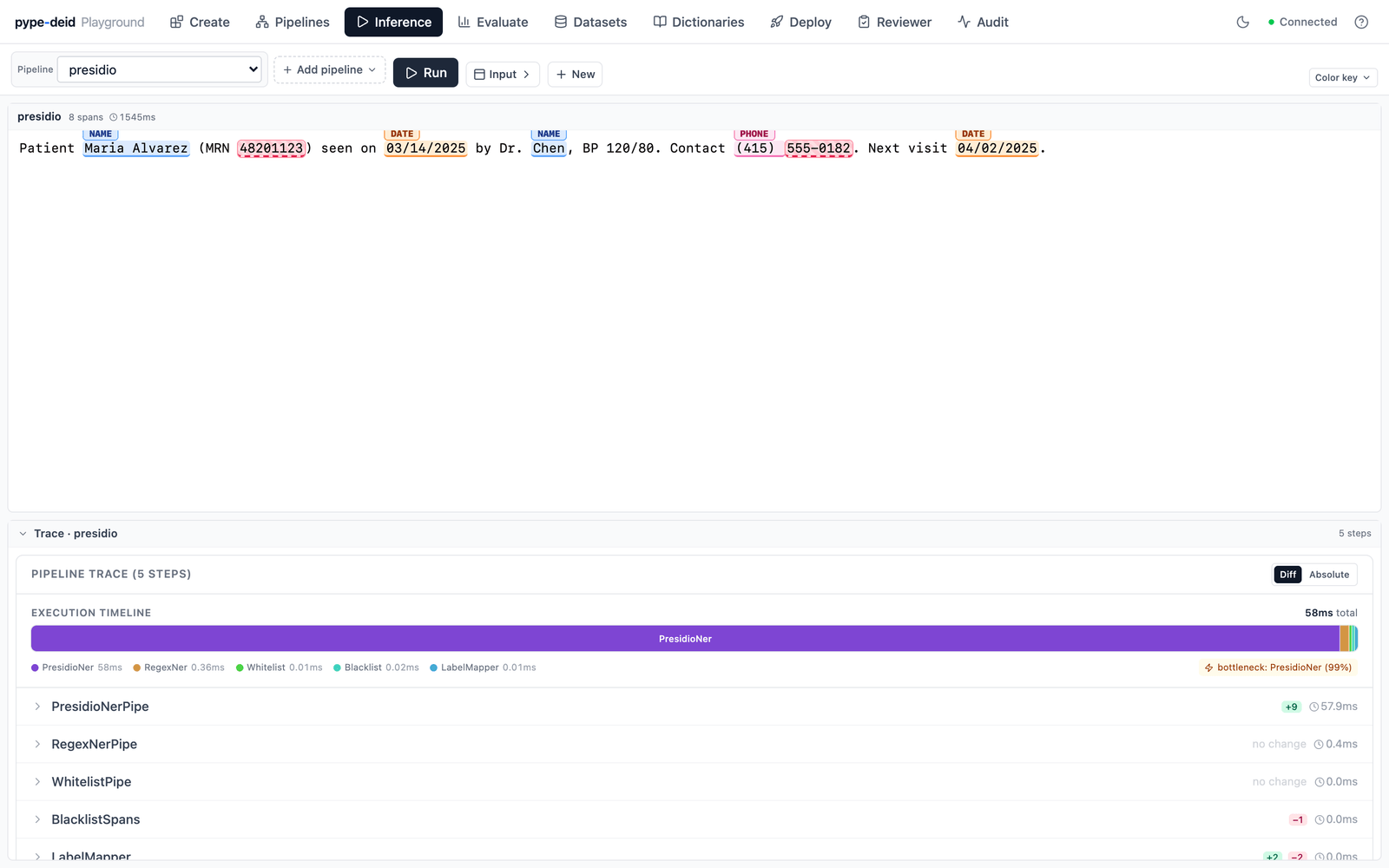
The same composition that buys flexibility has a cost surface. A regex-only fast mode returns in microseconds; add an ML or LLM stage and that one pipe dominates the budget — the waterfall calls out the bottleneck automatically, so the accuracy/latency tradeoff behind each mode is a thing you can see, not guess.
It’s the same indirection CDN providers play with DNS, or feature flags play with code paths. The thing the consumer holds (an alias) is decoupled from the thing the operator edits (the implementation). For a service where different clients want different detector mixes, where regulatory requirements shift, where new models keep coming out — that decoupling is the difference between an integration that survives change and one that breaks every time the system improves.
One production-posture choice worth mentioning: the service refuses to start without explicit configuration. Two environment flags — one for “I really do want to run with auth disabled” and one for “I really do want to let the LLM pipe call out to an external API with PHI in the prompt.” Both default to unset, and the app won’t come up without them being explicitly set to true. You can’t accidentally run an insecure deployment; you have to consciously choose to.
The thing I’m proudest of isn’t on any feature list
PypeDeid has two kinds of users. Operators who edit pipelines, register datasets, tune deploy config. And consumers who call the API or review output. They need different levels of authority, and the design that fell out of that is what I’m most happy with.
There’s a dual API key model. An admin key gates configuration routes — pipeline CRUD, dataset registration, deploy config, dictionaries. An inference key opens only POST /process/*, a health endpoint, and read-only audit. Two React apps, both thin over the same FastAPI backend: a Playground that ships an admin key, and a Production app that ships an inference key. The Production app doesn’t have routes for editing pipelines, but more importantly the backend would reject the request anyway. A client integrating against PypeDeid can ship the Production app to their reviewers and know it physically cannot modify the configuration their pipelines are running against.
What that scoping enables is the Production UI’s human-in-the-loop dataset workflow. A reviewer loads a batch of clinical notes, picks a deployed mode (fast, ensemble, whatever fits), runs detection across the batch, and then goes through note by note accepting, rejecting, or correcting individual spans. Once spans are right, applying the surrogate output mode replaces every detected identifier with a Faker-generated stand-in of the same label class — fake names, fake MRNs, fake dates that look real but aren’t.
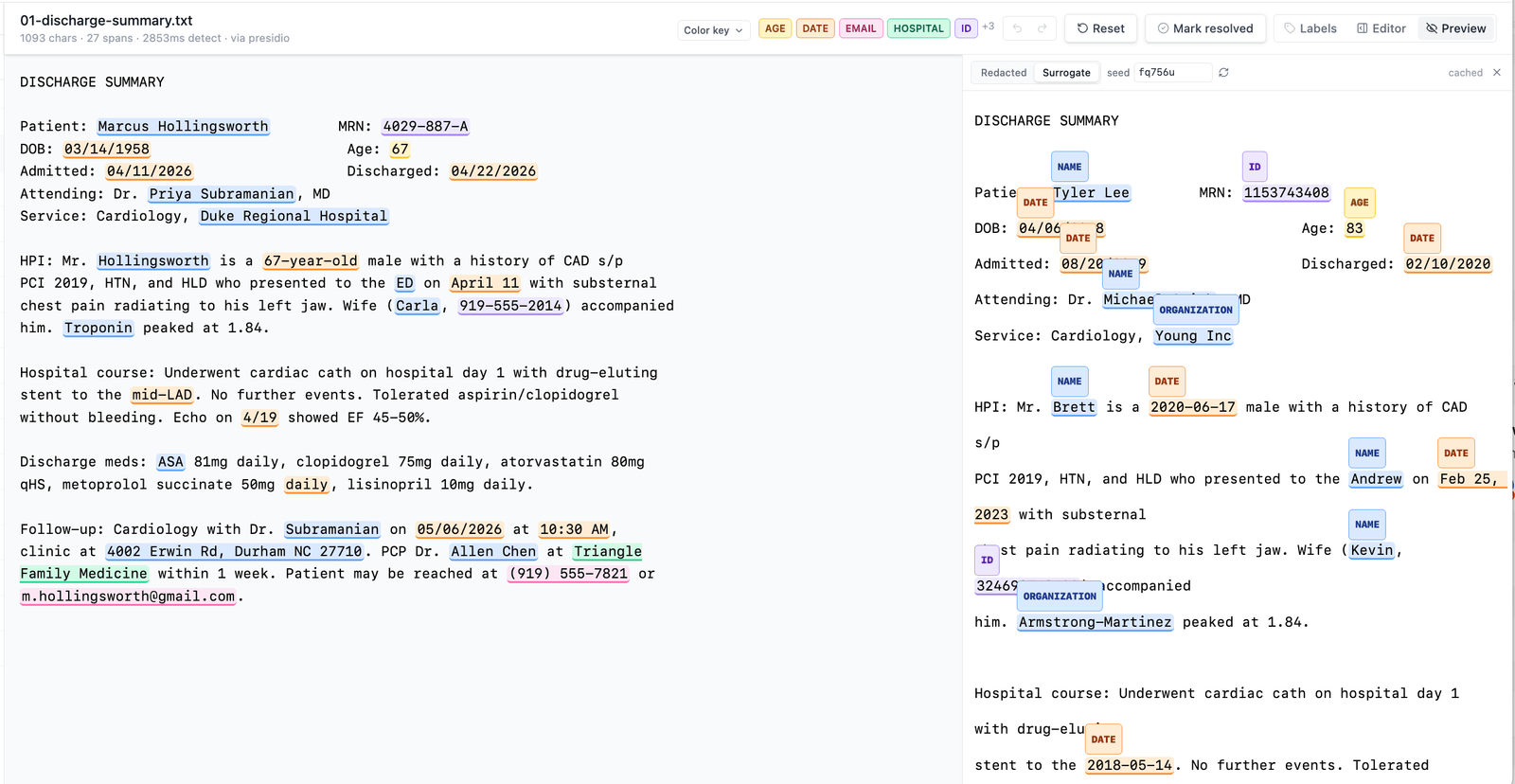
Inside the Production UI: original synthetic note with PHI spans highlighted (left), surrogate-replaced version (right). When the spans are right, what comes out is a labeled, de-identifiable note — and a batch of these is a clinical NER dataset that’s safe to share.
That’s what makes this system useful past one-off redaction. A provider sitting on a corpus of clinical notes can run them through a deployed pipeline, have reviewers with an inference key clean up the detection output, and walk away with a labeled NER dataset safe to ship — to a vendor, to a research partner, or to their own model-training pipeline. The pipeline isn’t just a redaction service; it’s the front half of a dataset-manufacturing workflow.
What I learned
The system’s behavior is whatever data it finds at startup. Pipelines, dictionaries, models, and deploy modes all live on disk, and the application reads them. Adding capability is editing data, not writing code. That’s the property that keeps a system useful without its author in the loop — and it’s the property the codebase is being tested on right now, since I’m still adding HuggingFace models to a frozen repo without touching any of it.
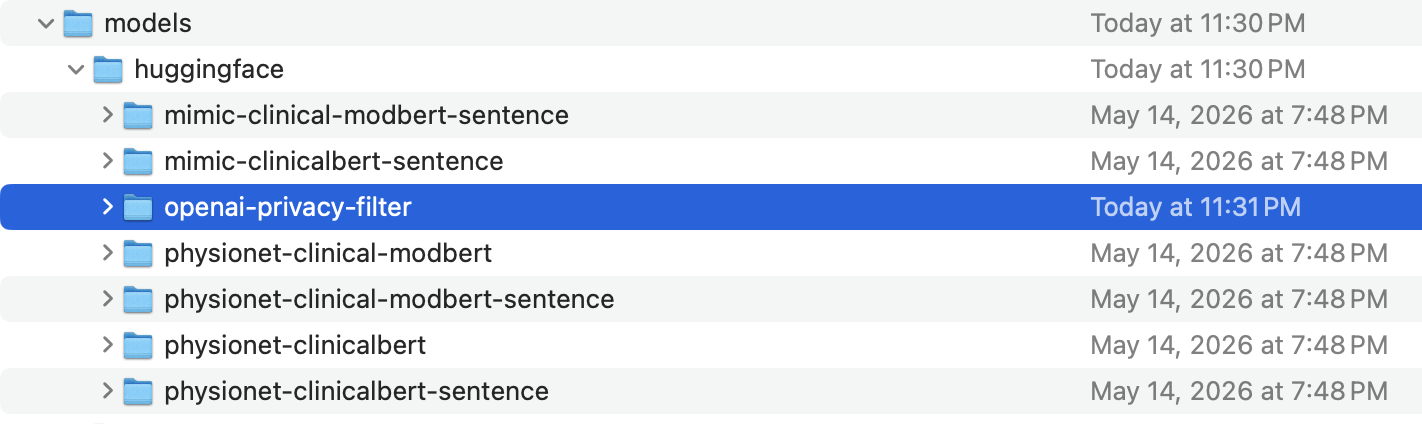
Adding a new model is a filesystem operation. The highlighted row is OpenAI’s open-source 1B-parameter privacy filter, dropped in next to my older fine-tuned BERTs.
The deeper version of the same lesson is one I only got to by shipping its opposite first. The old deid=ml | deid=llm switch was inheritance-shaped — one service with alternate code paths baked inside. Replacing it with a tiny protocol and a sequence of small composable parts is what made every other extensibility property fall out for free. Composition over inheritance, learned the hard way, by deploying the inheritance version into production and watching it get stuck.