Personal 2022
FireWatch
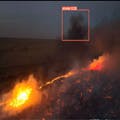 A night frame from the 2018 Holy Fire. This footage wasn’t in the training set. The app caught both smoke and active fire within seconds.
In 2018, California burned 1.9 million acres of wildland at an estimated $148.5 billion economic cost. The first few minutes after ignition matter more than anything that follows, but most fires start in places where no human is looking. By the time someone reports one, the fire usually has a head start.
This project was a small attempt at closing that gap. An iOS app paired with a DJI Mavic Pro drone, running a CoreML detector on-device that flags wildfires and pre-fire hazards in real time as the drone flies a patrol. The whole pipeline works without a cell signal, which is the only mode that matters in wildland. It was named a U.S. Division Semi-Finalist at the 2022 China–US Young Maker Competition.
The first version of it I ever pictured, though, wasn’t a fire detector. It was a tree planter.
I’d been reading about drones used to replant forests after wildfires, flying grids over scorched terrain and dropping seed pods. Drones were being used for the cleanup. I kept turning over whether they could be used earlier in the cycle, before the fire instead of after it. A human pilot watching a video feed is the same bottleneck wearing different clothes. The question was whether a consumer drone could do the looking itself.
Picking the stack
DJI Mavic Pro for the drone, since it had a real SDK and a real camera. iPad as the controller, since Apple’s Vision and CoreML frameworks meant I could run a detector on-device without standing up a server.
On-device wasn’t a deployment afterthought. It was the design call that locked everything else in. Wildfire patrols happen in remote terrain without reliable cell coverage. Pushing frames to a cloud endpoint over a flaky LTE link either drops the stream or eats seconds of latency on a problem where the first few minutes are the entire value proposition.
The model had to run in a place where it couldn’t call home.
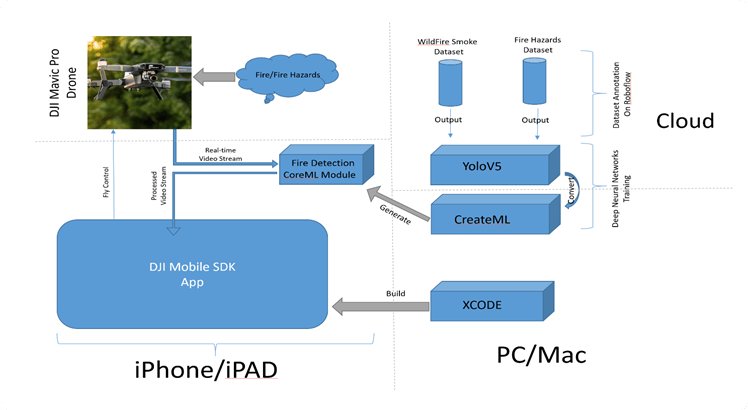 Drone, iPad, CoreML, overlay. Everything on-device. The whole pipeline runs in airplane mode.
Two classes, not one
The obvious dataset for this was wildfire imagery. The AI for Mankind / HPWREN academic archive of wildfire camera footage gave me 713 labeled images for free, enough for a single-class detector with reasonable accuracy. The straightforward project was right there.
I went a different direction. The pitch I wanted to make wasn’t “respond to fires faster,” it was “spot the things that are about to be on fire.” Dry vegetation, dry exposed roofs, the conditions a few hours before ignition when intervention is still cheap. So I scraped together a second, smaller class. About 86 internet-sourced images of pre-fire hazards, annotated in Roboflow alongside the wildfire data, trained as a two-class problem.
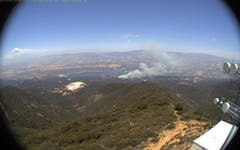 A sample annotation from the wildfire class. The HPWREN archive contributed the bulk of the training data; the smaller hazard class I built by hand.
The class imbalance was real. 713 fire images against 86 hazard images, and it showed up in the predictions: the hazard class was noisier, and stayed that way. But the project went from “detect fire” to “detect fire and the conditions that produce fire,” which is a more interesting product.
The model trained twice
The first detector was YOLOv5. “YOLO” stands for “You Only Look Once.” It’s a single-pass detection architecture: where older detectors in the R-CNN family propose regions first and then classify each one, YOLO divides the image into a grid and predicts bounding boxes and class probabilities for every cell in a single forward pass. The architectural payoff is speed. One pass per frame, fast enough to keep up with a live video feed.
I trained it in PyTorch on Google Colab. Standard recipe, solid accuracy on the held-out test set. Everything pointed forward.
Then I tried to get it onto the iPad.
The plan was to export the YOLOv5 weights to a CoreML .mlmodel so Apple’s Vision framework could consume them. On paper this was a one-line export. In practice, the resulting model either failed to load inside VNCoreMLRequest or returned outputs that didn’t decode into sensible bounding boxes.
I went deep on the conversion chain: YOLOv5 to ONNX to CoreML, custom layer compatibility, non-maximum suppression, output tensor shapes that didn’t match what Vision expected. None of it landed.
I spent real days on this. Longer than I should have, in retrospect. At some point the question stopped being “how do I fix the export” and started being “am I solving the right problem at all.” The system I needed was a working detector on the iPad, not specifically a YOLOv5 model. Treating those as the same thing was the mistake.
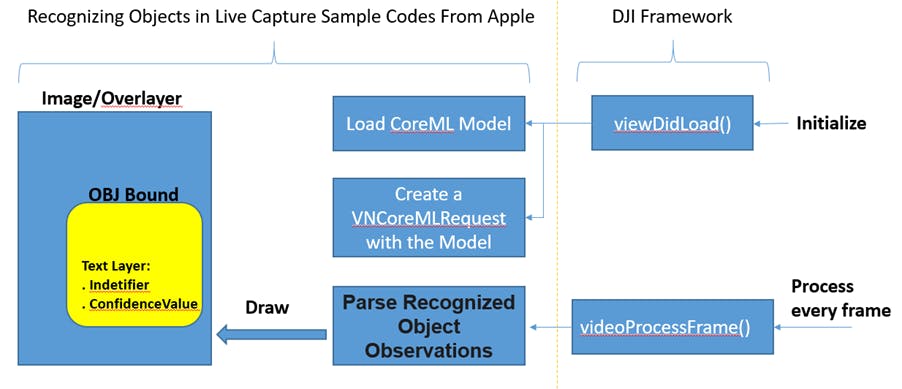 The integration the YOLOv5 export was supposed to make possible. Each frame from the DJI stream handed to a
 VNCoreMLRequest, results drawn on the preview overlay. Getting the model into this pipeline turned out to be the hardest part of the project.
I made the call to retrain from scratch in Apple’s CreateML. Same Roboflow-annotated dataset, same two classes, but using CreateML’s built-in object detection template, which natively produces a .mlmodel that Vision consumes without ceremony. I lost a lot of architectural control. I gained a model that actually ran.
The retrain finished the same day. The model hit 95% on the held-out test set and dropped into VNCoreMLRequest cleanly. The lesson I now repeat to myself whenever a technical path starts feeling like a tunnel is that for anything with a shipping deadline, the “right” architecture trapped behind a broken integration is worth less than a workable architecture that reaches the user.
You only look once, but I trained twice.
One app, two jobs
With the model running on-device, the rest of the project was an integration story.
The thing the iOS app had to do was simultaneously control the drone autonomously and run a CV model on its live video feed, in a single iOS process. On one side I had the DJI Mobile SDK exposing waypoint missions, telemetry, and a subscribable H.264 video stream. On the other side I had Apple’s Vision framework expecting a steady supply of CMSampleBuffer frames to feed through VNCoreMLRequest. Autopilot frameworks and computer vision frameworks don’t usually share a process, much less a thread. The join was my problem, not either SDK’s.
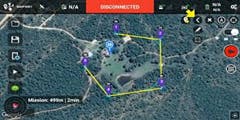 Waypoint missions through the DJI SDK. Operator draws a patrol perimeter, the drone flies it autonomously, the iPad watches.
What worked was a single per-frame path. The DJI video callback handed each frame to a VNCoreMLRequest initialized in viewDidLoad(); the completion handler parsed VNRecognizedObjectObservation results into bounding boxes on an overlay view. The waypoint side ran independently. The operator could draw a flight path on the map, upload the mission to the drone, and then keep their eyes on the iPad rather than the joystick.
The end state was a single app where one operator could plan a patrol, launch it, and let the drone fly while the detector flagged anything fire-shaped on the screen.
The 2018 Holy Fire test
The model hit 95% on the held-out test set. I didn’t trust that number, and I’d recommend you don’t trust it either.
The test set came from the same HPWREN distribution as the training data. Same cameras, similar angles, similar lighting. 95% on that test mostly proved that the model could memorize whatever HPWREN looks like. It said almost nothing about fires the model hadn’t seen cousins of.
So I went looking for a fire it hadn’t seen.
I pulled YouTube footage of the 2018 Holy Fire, a real wildfire in southern California, filmed by different cameras at different times of day. None of it was in my training data. I ran the FireDetect app against the footage frame by frame and watched what it flagged. The model picked up both distant smoke from a fire-watch-tower-style angle in daylight, and active flame in a dramatic night frame with both smoke and visible fire. Each within seconds of those events appearing on screen.
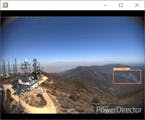 Distant smoke caught on Holy Fire footage outside the training set. This is the validation I’d point at, not the held-out test number.
I also surfaced the failures: missed detections on harder OOD frames, false positives on smoke-shaped clouds. The 95% accuracy was real, but the system was not infallible, and the Hackster writeup said so.
A test-set metric mostly tells you about your sampler. The validation that travels is the one that breaks the collection biases of your training data.
The competition writeup leaned on the Holy Fire test, not on the test-set accuracy number. The project was named a U.S. Division Semi-Finalist at the 2022 China–US Young Maker Competition.
What I’d do differently
Two things, concretely.
The CoreML pivot should have happened a week earlier. I knew within a day or two that the export was producing garbage. I kept going because the conversion chain felt like it should work, and “should work” is a trap. I want a tighter timebox on integration paths the next time I’m in this situation. At the first sign of “the docs say this is supported and it isn’t behaving like it’s supported,” start the parallel track immediately.
The hazard class needed more data. 86 internet-scraped images against 713 HPWREN frames was the asymmetry I could see on day one, and I shipped it anyway because the competition deadline was real. The hazard predictions were the noisier of the two in the wild, exactly as you’d expect. If I went back to it, that’s the first thing I’d fix: more images, tighter labeling, a separate validation pass on hazard-only footage.
The thing I’m still chewing on is the camera. The Mavic Pro’s resolution capped how far out a fire could be detected, but the UI didn’t surface that limit to the operator. An empty frame looked the same whether the drone was looking at clean sky or looking too far away to resolve smoke. A version of this system I’d actually want to put in the field would say “no fire detectable beyond X meters at current altitude” in the interface, so the absence of a bounding box couldn’t quietly be confused with the absence of fire.
That’s the version I’d build next.